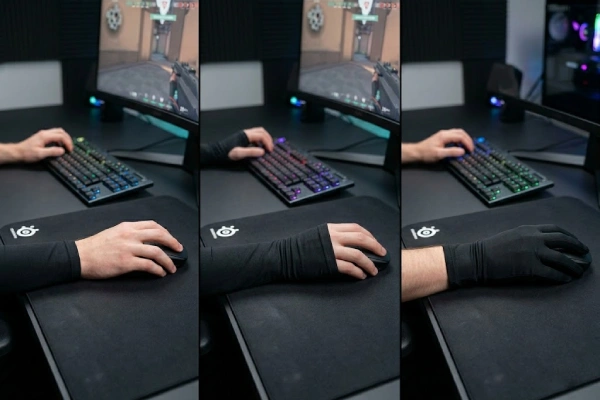
Your sleeve may feel wrong even when the fabric feels fine. The real issue is often the coverage shape, not the idea of wearing a sleeve.
Open palm gaming sleeves usually work best when you want direct mouse feel and only need forearm glide support. Thumb-hole styles are better when you need more stability and more palm-base coverage. Full-hand designs are often the better pick for sweat control, glass pads, and players who want steadier glide across more contact points.
A lot of players stop at one question: do gaming sleeves help at all?
That matters. But after that, the bigger question is what kind of coverage actually fits the way you play.
Some players want the least interference possible.
Some need the sleeve to stay locked in place.
Some deal with sweat, sticky drag, or palm-side friction that keeps changing through a session.
That is why open palm, thumb-hole, and full-hand gaming sleeves should not be treated as small style changes. They solve different problems. If you still want the bigger picture first, it helps to understand why gamers use arm sleeves in the first place.
What does each gaming sleeve design actually cover?
You may see three sleeve styles sold side by side. The shapes look similar at first, but the contact zones they control are not the same.
Open palm leaves more of your hand exposed. Thumb-hole adds anchoring and more palm-base coverage. Full-hand covers the largest area and replaces more skin contact with fabric, which can help more with sweat and sticky drag.
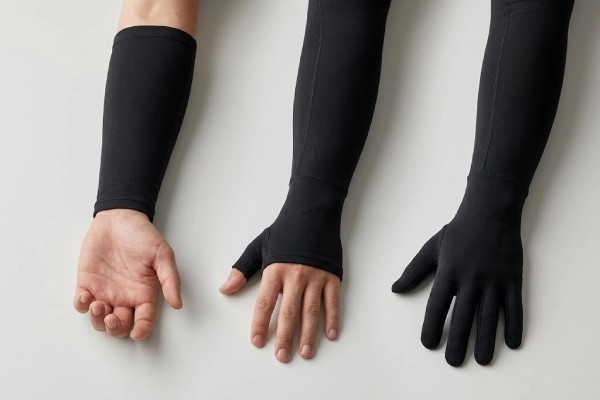
Open palm gaming sleeves extend down the arm and toward the hand, but they keep the palm and main mouse grip area mostly uncovered. That design is built for players who want to keep a more direct feel on the mouse shell while still reducing drag at the forearm, wrist edge, or lower palm area. If your main problem starts where your arm meets the desk or mousepad, open palm may already do enough.
Thumb-hole gaming sleeves cover more. They extend farther into the hand area and use a thumb opening to hold the sleeve in place. That changes two things at once. First, it helps stop the sleeve from moving around during larger swipes. Second, it covers more of the palm base and thumb-root zone, which are common friction points for low-sens players and anyone whose hand sits lower on the surface.
Full-hand gaming sleeves add the most coverage. They use a glove-like extension to cover a larger part of the hand, sometimes including the outer palm side or areas near the fingers. The goal is simple: replace more exposed skin contact with fabric contact. That can help a lot when sweat, oil, or sticky drag is the real problem.
Here’s the deal. These three styles are not ranked from “basic” to “advanced.” They are three different solutions for three different contact patterns. If your issue starts at the forearm, open palm can feel cleaner and easier. If your issue sits around the palm base, thumb-hole often makes more sense. If your problem spreads across more of the hand, full-hand has a stronger case.
Why does sleeve coverage change glide and consistency?
A sleeve does not give you instant aim skill. What it can do is reduce one unstable variable: changing skin friction during play.
Gaming sleeves usually help by reducing friction changes, not by adding raw performance on their own. The more your movement is affected by sweat, sticky skin, or changing contact points, the more coverage choice starts to matter.
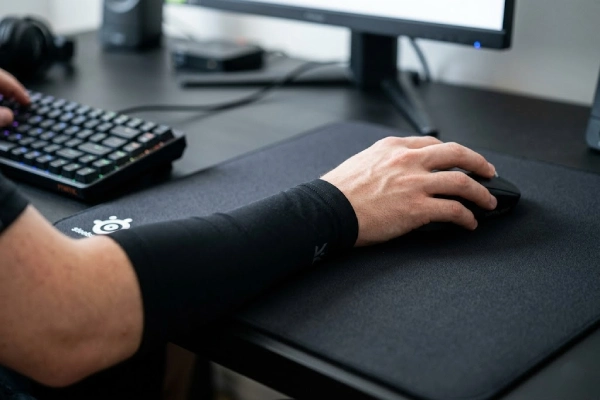
When your arm or hand moves across a desk or mousepad, the contact is never perfectly fixed. Sweat builds up. Skin oil changes the surface feel. Humidity affects drag. A long session can feel smooth at first, then strange later. That is why some players describe their aim as fine one hour and sticky the next.
A gaming sleeve helps by turning part of that skin contact into fabric contact. That matters because fabric usually behaves in a more predictable way than bare skin when heat and sweat start building up. But the amount of help depends on where the unstable contact is happening.
If your forearm is dragging, you do not always need more hand coverage. If your palm base keeps sticking, forearm coverage alone may not fix the problem. If your thumb-root or outer palm side is catching on the surface, then wider coverage can start to matter much more.
The truth is that many players judge gaming sleeves too quickly because they only ask, “Does it feel smoother?” The better question is, “Does it keep the same feel through the whole session?” That is where coverage design becomes more important. Open palm keeps more direct mouse feel, but it leaves more skin exposed. Thumb-hole gives you a middle path by covering more while staying fairly natural. Full-hand reduces the most skin contact, but it also changes the hand feel the most.
So what does this mean for you? It means the best sleeve is often not the one with the most material. It is the one that covers the zones that keep introducing friction changes into your setup.
When is an open palm gaming sleeve the better choice?
Some players want help with glide, but they do not want fabric getting too involved with the hand itself. That is where open palm sleeves often feel best.
Open palm gaming sleeves are often the better fit when you want the most natural mouse feel, faster adjustment, and less heat. They usually make the most sense when your drag problem starts at the forearm or wrist edge, not the palm base.
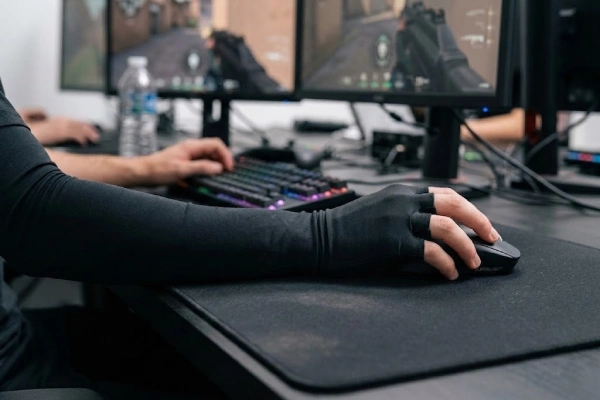
An open palm is usually the easiest style to get used to. Your hand still feels more like your hand. Your palm contact on the mouse stays closer to normal. Your fingers are not adapting to extra coverage. That makes open palm attractive for players who are sensitive to changes in grip feel or who switch between keyboard, mouse, and controller more often.
It also tends to feel cooler. Since more skin stays uncovered, the sleeve can feel less restrictive during longer sessions. That alone can matter. A sleeve that looks right on paper but feels distracting in real use will not stay useful for long.
Open palm works best when the friction problem stays lower on the arm. Maybe your forearm drags on the pad. Maybe the wrist edge rubs against the desk. Maybe you just want the glide benefit without changing the way your hand grips the mouse. In those cases, open palm often gives you enough help without adding much adaptation time.
But it does have limits. If the real issue sits at the palm base, open palm may leave too much exposed. If sweat builds up around the thumb-root or outer palm edge, that uncovered area can still create drag changes. And if your sleeve tends to shift during larger arm movement, open palm gives you less anchoring than a thumb-hole design.
You might be wondering whether a regular shirt sleeve can solve the same problem with less cost or less effort. In some setups, that question does come up. If you want to compare those tradeoffs directly, you can look at whether a regular long sleeve can do the same job.
When is a thumb-hole gaming sleeve the better choice?
If your sleeve moves too much, rolls at the wrist, or leaves exposed skin where you do not want it, thumb-hole designs usually start to make more sense.
Thumb-hole gaming sleeves are often the better option when you need more sleeve stability, more palm-base coverage, and less shifting during larger arm movement. They sit between open palm freedom and full-hand isolation.
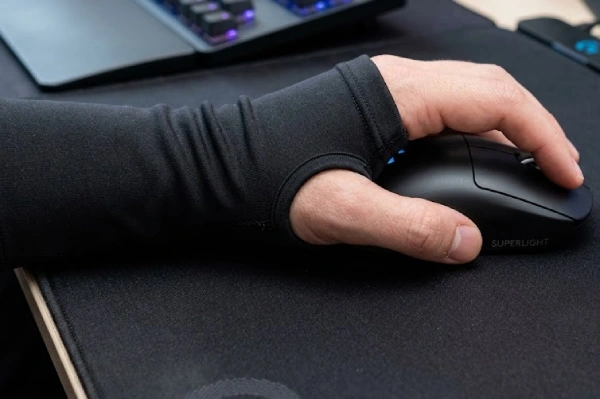
Thumb-hole sleeves exist for a reason. They do more than change the shape. They change how the sleeve stays positioned during play. The thumb opening acts like an anchor, which helps keep the lower part of the sleeve from riding up or twisting. That matters most for players who use bigger swipes, lower sensitivity, or more arm-based tracking.
They also cover more of the lower hand area. This is often the real benefit. The palm base and thumb-root zone can be high-friction spots, especially when your hand sits low on the mousepad or desk. A thumb-hole design covers more of that area without going full glove.
That is why thumb-hole sleeves often feel like the middle-ground option. They give more control than open palm, but they usually keep more natural mouse feel than full-hand styles. For many players, that balance is the sweet spot.
There are still tradeoffs. Fit matters more here because the thumb opening creates an extra pressure point. If the size is off, the sleeve can rub at the thumb or feel awkward during longer use. It also creates one more stress point in the structure. Poor construction shows up faster in this style. And if sleeve movement is already a big problem for you, it helps to understand why some sleeves keep sliding during play.
The bottom line? Thumb-hole makes the most sense when you want more stability and more lower-hand coverage without fully changing the feel of your mouse grip.
When is a full-hand gaming sleeve the better choice?
Some setups create more than light forearm drag. They create wide-area stickiness across the palm side of the hand. That is where full-hand sleeves have the strongest case.
Full-hand gaming sleeves are usually the strongest option for sweat isolation and maximum friction control. They can work very well for glass pads and high-contact users, but they also change mouse feel more than the other two designs.
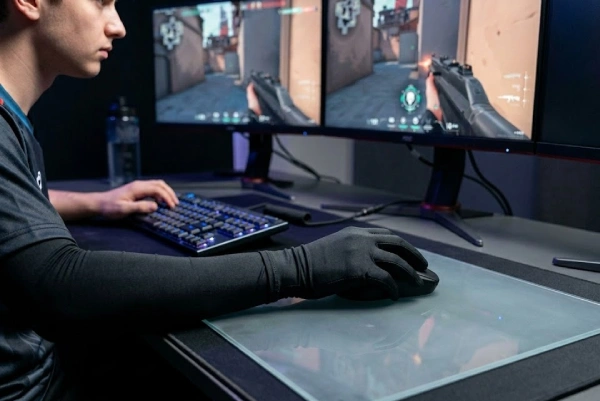
Full-hand sleeves cover the most area, so they isolate the most skin contact. That is their main advantage. If your palm side, thumb-root, or outer hand edge keeps sticking, a larger coverage shape can remove more of that problem from the surface. Players in hot rooms, humid conditions, or long sessions often notice this more clearly than players who stay dry.
This style can also be appealing for glass pad users. Hard, low-absorbent surfaces make sweat and skin drag feel more obvious. When more of the hand is covered, the movement can stay more consistent. That does not mean full-hand is always best, but it often has more upside in those setups. If that is your main concern, it helps to compare how gaming sleeves behave on glass and cloth mousepads.
Still, full-hand comes with the clearest tradeoffs. It can feel warmer. It can feel more wrapped. It can change grip sensation more than some players want. And it usually takes longer to adapt to than the other two styles. That does not make it bad. It just makes it more specific.
Here’s what most people miss. Full-hand is not the “best” version of a gaming sleeve. It is the strongest answer for a specific kind of friction problem. If that problem is yours, full-hand can feel great. If it is not, the extra coverage may feel like too much.
How should you choose the right gaming sleeve design for your setup?
Many buyers start with brand names or popular models. A better place to start is your actual contact pattern during play.
The best gaming sleeve design usually depends on your real contact points. If the drag is at the forearm, open palm may be enough. If it is at the palm base, thumb-hole often makes more sense. If multiple hand zones keep sticking, full-hand usually has more upside.
Start by figuring out where the friction problem actually happens. Is it mostly at the forearm? At the wrist edge? At the palm base? At the thumb-root? At the outer hand edge? Until you know that, sleeve selection stays vague.
Then match the shape to the problem. Forearm-only drag usually points toward open palm. Palm-base drag or sleeve movement usually points toward thumb-hole. Broad hand-side sticking, high sweat, or repeated drag across several zones usually points toward full-hand.
After that, balance consistency against feel. Some players care most about keeping direct mouse contact. Some care more about keeping glide consistent across the whole session. Neither goal is wrong. They just lead to different choices.
Movement style matters too. A player who uses more arm aim may value stability and broader contact control more than a player who lives mostly in wrist aim. That is why arm aim and wrist aim do not always need the same sleeve setup.
This is also where people start blending two different questions: coverage shape and pressure feel. They are not the same. Coverage changes which zones are isolated. Pressure changes how the sleeve feels on your arm. If you want that distinction explained more clearly, it helps to read how light compression changes the feel of a gaming sleeve.
What else matters besides coverage shape?
Coverage is a big factor, but it is not the only one. A well-shaped sleeve can still feel bad if the fit or construction is wrong.
Coverage shape is only one part of gaming sleeve performance. Fit, fabric surface, seam placement, edge finish, and heat build-up still affect how smooth and stable the sleeve feels over time.
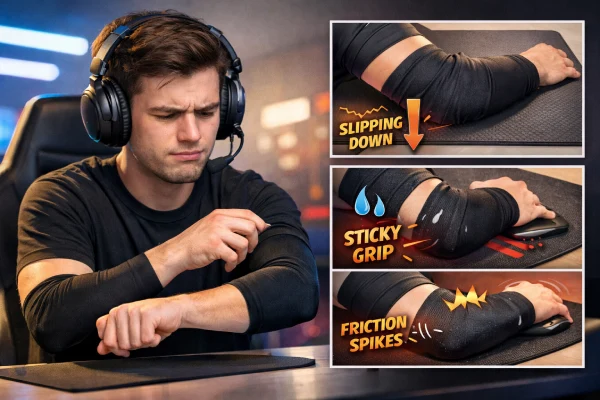
Fit comes first. A sleeve that is too loose can shift, bunch up, or leave exposed skin where you do not want it. A sleeve that is too tight can feel distracting, leave pressure marks, or make you change your wrist angle without noticing. The goal is not maximum tightness. It is stable contact without restriction. If fit is the question, start with how to measure for a fit that stays stable without feeling restrictive.
Fabric matters too, but not in a simple way. Two sleeves can both list spandex blends and still feel very different on the desk. Knit texture, surface finish, and stretch behavior all affect the real result. That is why fabric blend still affects how a sleeve feels on the desk even when the coverage shape looks perfect.
Construction details can also change everything. Rough seams, thick logo print, hard edge finish, or poor panel transitions can become local drag points. In some cases, those details matter more than the coverage style itself. If you want to see why, look at how seam construction can change glide more than people expect.
Then there is heat. More coverage usually means more warmth. For some players that tradeoff is easy to accept. For others, it becomes the reason they stop using the sleeve. Comfort is not a side issue. It affects how consistently you keep the same posture, grip, and motion through long sessions.
Conclusion
Open palm, thumb-hole, and full-hand gaming sleeves solve different friction problems. The right choice depends on where drag happens, how much coverage you need, and how much direct mouse feel you want to keep.
For brands, retailers, and gaming accessory buyers, that also means one style is rarely enough. Different users want different balances of glide, coverage, fit, and feel. If you are comparing supply options, it helps to review custom gaming sleeve options with different coverage styles.
FAQ
Open palm usually feels freer and keeps more direct mouse contact. Thumb-hole is often better when you want more stability and more coverage around the palm base.
They often help more on glass because they isolate more skin contact and reduce sweat-related stickiness. Still, some players may prefer less coverage for better mouse feel.
It often helps because the thumb opening anchors the sleeve better. That can reduce rolling, shifting, and exposed-skin friction during larger arm movement.
Open palm usually feels cooler because more skin stays exposed. Full-hand designs cover more area, so they may feel warmer over time.
No. More coverage can reduce friction changes, but it can also change comfort and grip feel. The better design is the one that solves your actual contact problem.
Look at fit, fabric feel, seam smoothness, edge finish, and heat build-up. A good shape can still feel bad if the construction creates drag points.